Robert Desprez Communications

  • My Services
  • My Blog
  • About Me
  • Contact Me

SharePoint 2010 for technical writers

July 6, 2012 by RDesprez 7 Comments

When I first start­ed using Share­Point, I have to admit that I was not impressed.

The user inter­face felt unin­spired. Some soft­ware user inter­faces draw you in. For me, Share­Point was­n’t one of them. I remem­ber won­der­ing, “Why would I want to use this?”

I’ve changed my tune. After learn­ing more about Share­Point’s ben­e­fits and using it at sev­er­al client sites, I rec­og­nize that it offers a num­ber of ben­e­fits to tech­ni­cal writers:

* Share­Point pro­vides a basic Con­tent Man­age­ment Sys­tem (CMS). Peo­ple use a CMS to pub­lish, edit, and man­age con­tent, such as doc­u­ments. A full-blown CMS is expen­sive where­as Share­Point is fre­quent­ly already installed in larg­er orga­ni­za­tions. Tech­ni­cal writ­ers can use it to gain con­trol over their doc­u­ments at the file level.

* Share­Point Foun­da­tion 2010 is free. Share­Point 2010 is avail­able in two flavours: Share­Point Serv­er 2010 and Share­Point Foun­da­tion. Share­Point Serv­er offers more fea­tures than Share­Point Foun­da­tion but the lat­ter is free.

* You can use meta­da­ta to tag your files. If you are work­ing on a lot of con­tent, adding meta­da­ta to your files may be a worth­while invest­ment because it helps group your con­tent into cat­e­gories. Meta­da­ta is a col­lec­tion of cen­tral­ly man­aged terms that you can define and then use as attrib­ut­es for a file. Then, after you have tagged your con­tent, oth­er writ­ers can search for doc­u­ments using the same categories—content is eas­i­er to find and update.

* Source con­trol. Share­Point requires you to check out files before you edit them and offers ver­sion con­trol of the file. Ver­sion con­trol essen­tial­ly keeps a his­to­ry of the file. If for some rea­son you want to res­ur­rect an ear­li­er ver­sion of a doc­u­ment, Share­Point makes it easy.

* Col­lab­o­ra­tion. Share­Point enables teams to col­lab­o­rate on files. If you are work­ing with anoth­er per­son on a file, each writer can work on the con­tent con­cur­rent­ly and the lat­est ver­sion is then uploaded to the Share­Point site.

* Doc­u­ment con­trol. Share­Point makes it pos­si­ble to restrict users at the site lev­el. Best prac­tices sug­gest assign­ing employ­ees or con­trac­tors to user groups.

* Work­flows. In Share­Point, you can auto­mate the review process. As a writer, you can cre­ate a list of review­ers and add dead­lines. Share­Point then sends e‑mails to SMEs and sends you an e‑mail when they have reviewed the document.
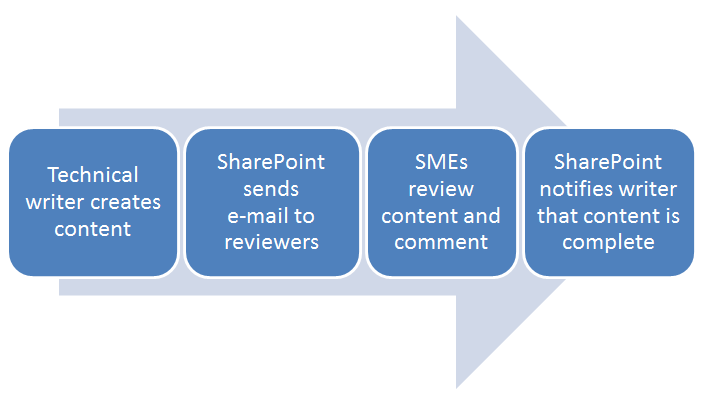
* Trans­la­tion work­flows. If you need to trans­late your con­tent, Share­Point can assist with the process by remind­ing exter­nal stake­hold­ers to per­form tasks by cer­tain dates, and e‑mails you when all of the work is complete.

* Easy to use. Share­Point has a sim­i­lar look and feel to oth­er Microsoft Office prod­ucts. It sports the famil­iar Microsoft rib­bon and the tasks are pret­ty straight­for­ward (for tech­ni­cal writ­ers, at least).

* Lots of sup­port con­tent. There are many books, web sites, and blogs about Share­Point. For exam­ple, check out these online train­ing courses.

The bot­tom line: Share­Point is a worth­while tool if col­lab­o­ra­tion is impor­tant and you need con­trol over your source files. Sounds like a good fit for most tech­ni­cal writers.

Filed Under: Career Development, Online Collaboration, Robert Desprez | Vancouver technical writer | Blog, Technology, Web 2.0 Tagged With: benefits of SharePoint, technical writers

About Robert Desprez

I have worked as a Vancouver technical writer for more than 20 years, working at some of British Columbia's largest high-tech firms. I have served in leadership positions for the Society for Technical Communication and have worked as a writing instructor at Vancouver's Simon Fraser University.

Robert Desprez Follow 1,204 239

Vancouver Technical Writer. Former Instructor at Simon Fraser University. Dog Lover. Coffee Drinker. Tennis and Piano Player.

robert_desprez
robert_desprez avatar; Robert Desprez @robert_desprez ·
11 Apr 2043062547159589215

Image for twitter card

ChatGPT vs. Gemini: I Tested Both, and the Winner Might Surpise You

Curious about AI chatbots but don’t know where to start? ChatGPT and Gemini are two of the best, and I'm her...

www.pcmag.com

Reply on Twitter 2043062547159589215 Retweet on Twitter 2043062547159589215 0 Like on Twitter 2043062547159589215 0 Twitter 2043062547159589215
robert_desprez avatar; Robert Desprez @robert_desprez ·
22 Mar 2035801301733527930

Image for twitter card

Remote work can help offset oil price shock, IEA says | LinkedIn

The International Energy Agency has outlined 10 strategies to help oil-consuming nations mitigate the impact of rising prices.

www.linkedin.com

Reply on Twitter 2035801301733527930 Retweet on Twitter 2035801301733527930 0 Like on Twitter 2035801301733527930 0 Twitter 2035801301733527930
robert_desprez avatar; Robert Desprez @robert_desprez ·
21 Mar 2035393914396692588

‘Microshifting’ puts a new spin on 9-to-5 schedules

Image for twitter card

‘Microshifting’ puts a new spin on 9-to-5 schedules

A new way of scheduling work time is remaking the typical nine-to-five routine. “Microshifting” is a trend that ...

apnews.com

Reply on Twitter 2035393914396692588 Retweet on Twitter 2035393914396692588 0 Like on Twitter 2035393914396692588 0 Twitter 2035393914396692588
robert_desprez avatar; Robert Desprez @robert_desprez ·
16 Mar 2033691191984984182

The cost of digital disorganization is nearly a month of productivity per year

Image for twitter card

The cost of digital disorganization is nearly a month of productivity per year

The problem often stems from unclear systems and ownership inside organizations, but simple habits and clearer workflo...

www.theglobeandmail.com

Reply on Twitter 2033691191984984182 Retweet on Twitter 2033691191984984182 0 Like on Twitter 2033691191984984182 0 Twitter 2033691191984984182
Load More

Recent Blog Posts

  • Using ChatGPT to read smarter
  • ChatGPT: The AI-powered proofreader
  • Four ways Confluence could be better
  • First impressions of MadCap’s purchase of IXIASOFT

About Me

Robert Desprez I have worked as a Vancouver technical writer for more than 20 years, working at Kodak, Boeing, Teck Resources, and FortisBC. In addition, I have worked as a writing instructor at Simon Fraser University in Vancouver.

Contact Me

Robert Desprez Com­mu­ni­ca­tions Inc.
North Van­cou­ver, British Columbia
Canada
Phone: 604–836-4290

  • Email
  • LinkedIn
  • Twitter

Copyright © 2026  · Robert Desprez Communications Inc.