Robert Desprez Communications

  • My Services
  • My Blog
  • About Me
  • Contact Me

First Impressions of Adobe RoboHelp 2019

September 2, 2018 by RDesprez Leave a Comment

Adobe just released a new ver­sion of FrameMak­er and Robo­Help last month.  If you have used the appli­ca­tion for years, you might be for­giv­en for not even rec­og­niz­ing RoboHelp—it’s been com­plete­ly revamped.

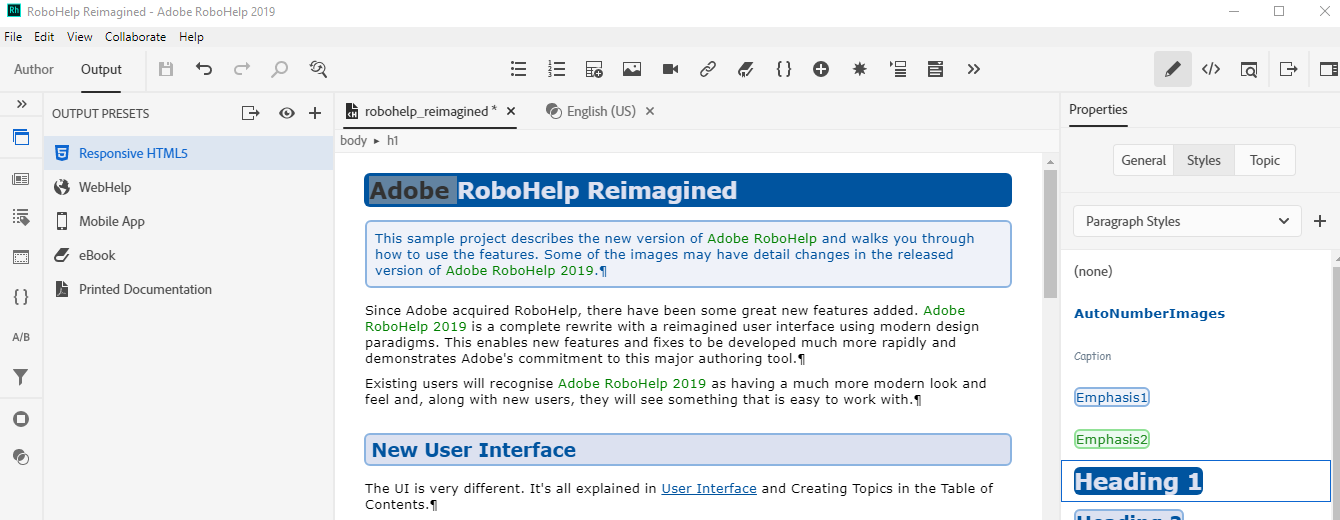
First, for such an old pro­gram (more than 25 years!), Adobe has per­formed an “extreme makeover” when it comes to the user inter­face. It’s clean and mod­ern. It looks like a new application.

RoboHelp 2019 user interface

Adobe has bestowed Robo­Help with a min­i­mal­ist user inter­face. There are not dozens of icons to click like you see in an appli­ca­tion like Microsoft Word. Even though it looks dra­mat­i­cal­ly dif­fer­ent than old­er ver­sions of the pro­gram, I found myself being able to use it right away. How­ev­er, Adobe prob­a­bly rec­og­nized that not every­one wants to learn a new user inter­face so the com­pa­ny is also includ­ing Robo­Help Clas­sic 2019 for those users who pre­fer to work in famil­iar ways.

A Quick Way to Generate Output Files

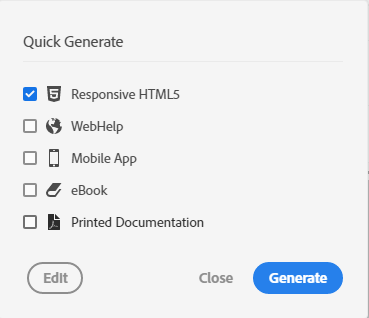
I like the new way in which you can out­put files.

When you click the Quick Gen­er­ate icon, you can click the out­put you want to gen­er­ate. I like that you can cre­ate out­put files with­out a lot of con­fig­u­ra­tion. I also appre­ci­ate that you can keep work­ing while Robo­Help cre­ates the files in the back­ground. If you want to tweak set­tings for an out­put file, there’s still the Edit button.
Adobe Further Improves RoboHelp’s Search

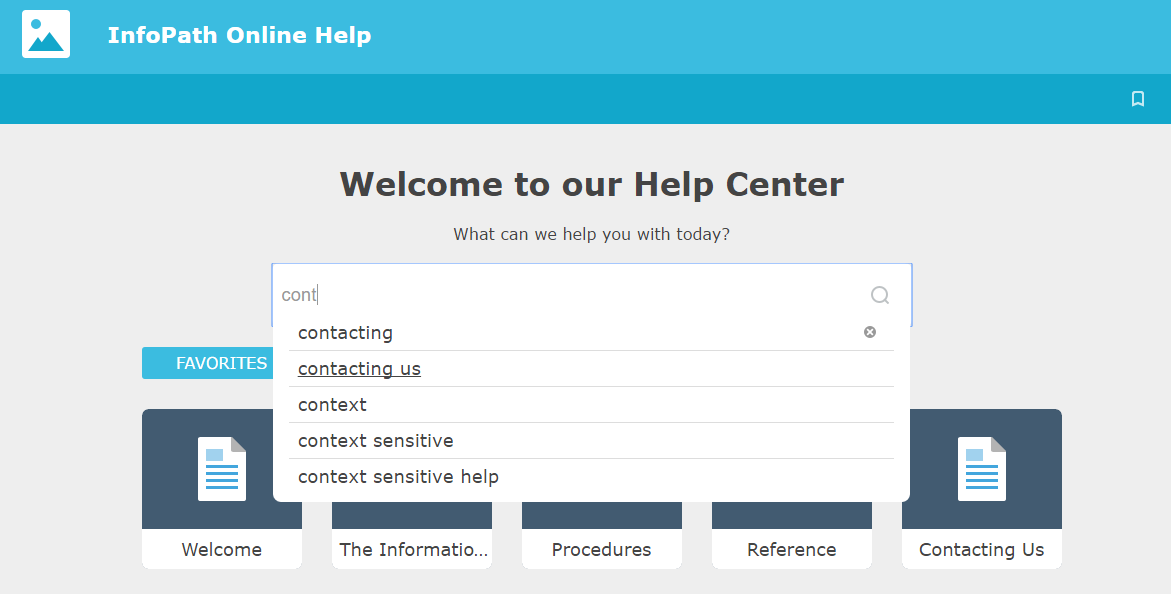
Robo­Help 2019 builds on some of the improve­ments intro­duced in Robo­Help 2017. Most notably, Robo­Help 2017 includ­ed some wel­come improve­ments by dis­play­ing key­words as users type in the search field. For exam­ple, when I start typ­ing a search query about “con­tact­ing,” Robo­Help starts pro­vid­ing sug­ges­tions on the fly, sim­i­lar to Google’s search engine.

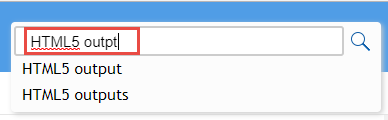
Robo­Help 2019 includes pre­dic­tive search but will also fix users’ typos.  For exam­ple, if I type “HTML5 out­pt,” the HTML5 Help auto­mat­i­cal­ly presents the cor­rect­ed results for me. Giv­en that many users may inad­ver­tent­ly add typos in their search queries, this is a wel­come addition.

RoboHelp 2019 Supports Git, HTML5, and Scalable Vector Graphics

Robo­Help also includes sup­port for Share­Point Online and Git, HTML5, Cas­cad­ing Style Sheets (CSS) 3, and Scal­able Vec­tor Graph­ics (SVG) images. Share­Point and Share­Point Online are not the same thing. With Share­Point Online, you can access inter­nal sites, doc­u­ments, and oth­er infor­ma­tion from anywhere—at the office, at home, or from a mobile device. Git is a ver­sion con­trol sys­tem for track­ing changes in com­put­er files and coor­di­nat­ing work on those files among mul­ti­ple people.

Over­all, I am impressed with the Adobe’s com­mit­ment to over­haul RoboHelp!


Filed Under: Help Authoring Tools, Robert Desprez | Vancouver technical writer | Blog, Technology Tagged With: Adobe, Adobe RoboHelp 2019, Help Authoring Tools, Review

RoboHelp 2017 Delivers Improved Search

March 5, 2017 by RDesprez 1 Comment

I can­not imag­ine life with­out search and I know I am not alone. A study by Pew Inter­net found that 92 per­cent of U.S. adults who are online use search engines to find infor­ma­tion on the Internet.

When I have a prob­lem with some­thing I own, such as Apple TV, I might look up the prob­lem in the print­ed doc­u­men­ta­tion (if I still have it!), go to the manufacturer’s web site, or just type the name and mod­el of the prod­uct in Google’s search field. From my expe­ri­ence, Google often pro­vides results that are as use­ful as the manufacturer’s sup­port web site.

In a world where users have embraced search, Robo­Help 2017 includes some wel­come improve­ments by dis­play­ing key­words as you type in the search field. For exam­ple, when I start typ­ing a search query about “con­tact­ing,” Robo­Help starts pro­vid­ing sug­ges­tions on the fly, sim­i­lar to Google’s search engine. This “pre­dic­tive search” is avail­able in the Respon­sive HTML5 out­put that is shipped with the lat­est ver­sion of RoboHelp.

RoboHelp's 2017 new HTML5 output

Accord­ing to usabil­i­ty con­sul­tant Jakob Nielsen, users love search for two reasons:

  • Search lets users “con­trol their own des­tiny” and assert inde­pen­dence from com­pa­nies’ attempts to direct vis­i­tors on web sites.
  • Search is also users’ “escape hatch when they are stuck in nav­i­ga­tion.” When they can’t find a rea­son­able place to go next, they often turn to the site’s search function.

Giv­en that users love using search, it’s some­what sur­pris­ing that Nielsen found that they are often not very savvy when it comes to for­mu­lat­ing search queries.  He writes: “Typ­i­cal users are very poor at query refor­mu­la­tion: If they don’t get good results on the first try, lat­er search attempts rarely suc­ceed. In fact, they often give up.”

RoboHelp’s new search fea­ture may help mit­i­gate users’ weak­ness at writ­ing good search queries. Some oth­er ben­e­fits of RoboHelp’s search engine include:

  • Search results change, depend­ing on the posi­tion of the cur­sor: Robo­Help may dis­play dif­fer­ent terms, depend­ing on the posi­tion of the cur­sor in the search field.
  • Spell check fix­es incor­rect­ly spelled words: If users mis­spell words, the search engine rec­om­mends words that are most sim­i­lar to each word. Robo­Help accom­mo­dates for up to two mis­spelled words in each search query.
  • Search algo­rithm includes users’ search his­to­ries: Robo­Help 2017 stores past search­es in cook­ies and dis­plays any match­ing search­es in the search results.

As cus­tomers increas­ing­ly focus on search to find rel­e­vant con­tent, Robo­Help’s new search engine is a wel­come addi­tion that should improve the user experience.

Filed Under: Help Authoring Tools, Robert Desprez | Vancouver technical writer | Blog Tagged With: Adobe, RoboHelp, RoboHelp 2017, search

About Robert Desprez

I have worked as a Vancouver technical writer for more than 20 years, working at some of British Columbia's largest high-tech firms. I have served in leadership positions for the Society for Technical Communication and have worked as a writing instructor at Vancouver's Simon Fraser University.

Robert Desprez Follow 1,208 240

Vancouver Technical Writer. Former Instructor at Simon Fraser University. Dog Lover. Coffee Drinker. Tennis and Piano Player.

robert_desprez
robert_desprez avatar; Robert Desprez @robert_desprez ·
26 Jul 2081426469667180993

Are we living in a post-literate society?

Image for twitter card

Opinion: A viral essay declares the end of reading is here. But there’s no end to its pleasures

To all Canadians who still buy books: Tell each other about the ones you love

www.theglobeandmail.com

Reply on Twitter 2081426469667180993 Retweet on Twitter 2081426469667180993 0 Like on Twitter 2081426469667180993 1 Twitter 2081426469667180993
robert_desprez avatar; Robert Desprez @robert_desprez ·
26 Jul 2081426169262674164

Image for twitter card

Being effective at work boils down to knowledge, methods, people and technology

Think of your effectiveness architecture as a two-storey house, says Melissa Swift. On the ground floor are knowledg...

www.theglobeandmail.com

Reply on Twitter 2081426169262674164 Retweet on Twitter 2081426169262674164 0 Like on Twitter 2081426169262674164 0 Twitter 2081426169262674164
Retweet on Twitter Robert Desprez Retweeted
robert_desprez avatar; Robert Desprez @robert_desprez ·
21 Jul 2079411504575877320

Being effective at work boils down to knowledge, methods, people and technology

Reply on Twitter 2079411504575877320 Retweet on Twitter 2079411504575877320 1 Like on Twitter 2079411504575877320 0 Twitter 2079411504575877320
robert_desprez avatar; Robert Desprez @robert_desprez ·
21 Jul 2079411504575877320

Being effective at work boils down to knowledge, methods, people and technology

Image for twitter card

Being effective at work boils down to knowledge, methods, people and technology

Think of your effectiveness architecture as a two-storey house, says Melissa Swift. On the ground floor are knowledg...

www.theglobeandmail.com

Reply on Twitter 2079411504575877320 Retweet on Twitter 2079411504575877320 1 Like on Twitter 2079411504575877320 0 Twitter 2079411504575877320
Load More

Recent Blog Posts

  • Using ChatGPT to read smarter
  • ChatGPT: The AI-powered proofreader
  • Four ways Confluence could be better
  • First impressions of MadCap’s purchase of IXIASOFT

About Me

Robert Desprez I have worked as a Vancouver technical writer for more than 20 years, working at Kodak, Boeing, Teck Resources, and FortisBC. In addition, I have worked as a writing instructor at Simon Fraser University in Vancouver.

Contact Me

Robert Desprez Com­mu­ni­ca­tions Inc.
North Van­cou­ver, British Columbia
Canada
Phone: 604–836-4290

  • Email
  • LinkedIn
  • Twitter

Copyright © 2026  · Robert Desprez Communications Inc.

imunify-bot-check