Robert Desprez Communications

  • My Services
  • My Blog
  • About Me
  • Contact Me

Editing Tips in Word: Automated Ways to Find Acronyms

August 12, 2016 by RDesprez 5 Comments

For all the dis­cus­sion about using con­tent man­age­ment, Dar­win Infor­ma­tion Typ­ing Archi­tec­ture (DITA), and writ­ing for tablets and smart­phones, I find that most clients I work with are still writ­ing at least some con­tent in Microsoft Word.

Most tech­ni­cal writ­ers I know agree that Word has its share of weak­ness­es when author­ing long tech­ni­cal doc­u­ments. Still, many clients grav­i­tate towards it because it’s con­sid­ered “free”—it is almost always installed at a client’s workplace.

For a cur­rent client, I edit long tech­ni­cal Word doc­u­ments that are often rid­dled with acronyms.

I edit the con­tent using some of the stan­dard tech­niques used by edi­tors and tech­ni­cal writ­ers: I com­pare the terms used in the doc­u­ment against the department’s style guide and I use an edit­ing check­list. With­in the last year, I’ve also start­ed using Word’s find fea­ture to scru­ti­nize the document’s acronyms and initialisms.

Finding Acronyms Automatically in Word

In almost every doc­u­ment I read for one client, there is an issue with acronyms not being spelled out or acronyms being incon­sis­tent­ly applied. One auto­mat­ed way to find all the acronyms in a doc­u­ment is to use wild­cards in Word’s Find menu. I first dis­cov­ered this trick on LifeHacker’s web site. I doc­u­ment­ed the fol­low­ing steps using Microsoft Word 2016.

To look for acronyms in a document:

  1. In Word, open a file that you want to edit.
  2. Open the Find win­dow (press Ctrl + F on your keyboard).
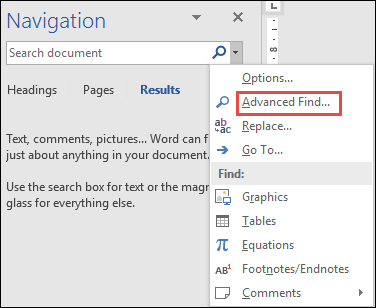
  3. In the Nav­i­ga­tion pane, select Advanced Find.

Advanced_Find

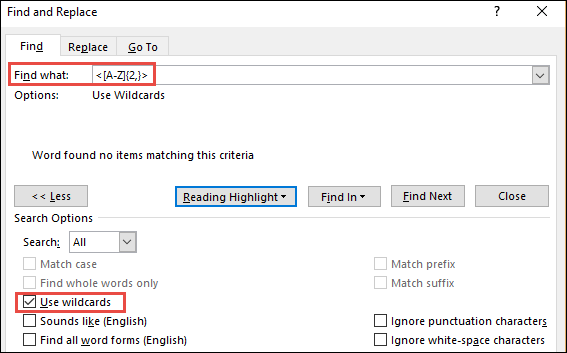
  1. Click the More » but­ton.
  2. In the Find what field, type <[A‑Z]{2,}>
  3. Select the Use wild­cards check box.

Find_and_replace_wildcards

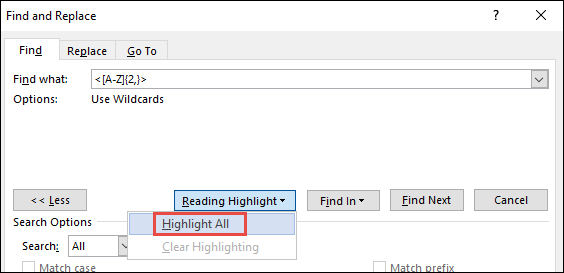
  1. Click Read­ing High­light, and then select High­light All.

Find_and_replace_highlight_all

Word high­lights all the ini­tialisms and acronyms in the file. Here is an example:

Acronyms in Word_example

I have found that auto­mat­i­cal­ly search­ing for acronyms has been a tremen­dous time saver and has helped me find count­less incon­sis­ten­cies in client files.

When edit­ing tech­ni­cal doc­u­ments, what tips or tricks have you used to find errors and inconsistencies?

Filed Under: Career Development, Online Writing, Robert Desprez | Vancouver technical writer | Blog Tagged With: acronyms, documents, editing, Microsoft Word, technical writing

About Robert Desprez

I have worked as a Vancouver technical writer for more than 20 years, working at some of British Columbia's largest high-tech firms. I have served in leadership positions for the Society for Technical Communication and have worked as a writing instructor at Vancouver's Simon Fraser University.

Robert Desprez Follow 1,208 239

Vancouver Technical Writer. Former Instructor at Simon Fraser University. Dog Lover. Coffee Drinker. Tennis and Piano Player.

robert_desprez
robert_desprez avatar; Robert Desprez @robert_desprez ·
26 Jul 2081426469667180993

Are we living in a post-literate society?

Image for twitter card

Opinion: A viral essay declares the end of reading is here. But there’s no end to its pleasures

To all Canadians who still buy books: Tell each other about the ones you love

www.theglobeandmail.com

Reply on Twitter 2081426469667180993 Retweet on Twitter 2081426469667180993 0 Like on Twitter 2081426469667180993 0 Twitter 2081426469667180993
robert_desprez avatar; Robert Desprez @robert_desprez ·
26 Jul 2081426169262674164

Image for twitter card

Being effective at work boils down to knowledge, methods, people and technology

Think of your effectiveness architecture as a two-storey house, says Melissa Swift. On the ground floor are knowledg...

www.theglobeandmail.com

Reply on Twitter 2081426169262674164 Retweet on Twitter 2081426169262674164 0 Like on Twitter 2081426169262674164 0 Twitter 2081426169262674164
Retweet on Twitter Robert Desprez Retweeted
robert_desprez avatar; Robert Desprez @robert_desprez ·
21 Jul 2079411504575877320

Being effective at work boils down to knowledge, methods, people and technology

Reply on Twitter 2079411504575877320 Retweet on Twitter 2079411504575877320 1 Like on Twitter 2079411504575877320 0 Twitter 2079411504575877320
robert_desprez avatar; Robert Desprez @robert_desprez ·
21 Jul 2079411504575877320

Being effective at work boils down to knowledge, methods, people and technology

Image for twitter card

Being effective at work boils down to knowledge, methods, people and technology

Think of your effectiveness architecture as a two-storey house, says Melissa Swift. On the ground floor are knowledg...

www.theglobeandmail.com

Reply on Twitter 2079411504575877320 Retweet on Twitter 2079411504575877320 1 Like on Twitter 2079411504575877320 0 Twitter 2079411504575877320
Load More

Recent Blog Posts

  • Using ChatGPT to read smarter
  • ChatGPT: The AI-powered proofreader
  • Four ways Confluence could be better
  • First impressions of MadCap’s purchase of IXIASOFT

About Me

Robert Desprez I have worked as a Vancouver technical writer for more than 20 years, working at Kodak, Boeing, Teck Resources, and FortisBC. In addition, I have worked as a writing instructor at Simon Fraser University in Vancouver.

Contact Me

Robert Desprez Com­mu­ni­ca­tions Inc.
North Van­cou­ver, British Columbia
Canada
Phone: 604–836-4290

  • Email
  • LinkedIn
  • Twitter

Copyright © 2026  · Robert Desprez Communications Inc.