Robert Desprez Communications

  • My Services
  • My Blog
  • About Me
  • Contact Me
You are here: Home / Robert Desprez | Vancouver technical writer | Blog / Easily Create Mobile Apps from FrameMaker

Easily Create Mobile Apps from FrameMaker

May 8, 2016 by RDesprez Leave a Comment

Tweet

With FrameMak­er 2015, tech­ni­cal writ­ers can eas­i­ly cre­ate mobile apps that run on iOS and Android smart­phones and tablets.

What is a Mobile App?

A mobile appli­ca­tion, most com­mon­ly referred to as an app, is a type of appli­ca­tion soft­ware designed to run on a mobile device, such as a smart­phone or tablet com­put­er. Why cre­ate an app? Con­sid­er some of the recent mobile trends that affect how tech­ni­cal writ­ers per­form their jobs:

  • The pop­u­lar­i­ty of apps is unde­ni­able. Eighty-five per­cent of users said they pre­fer using apps com­pared to mobile web sites. In addi­tion, users are spend­ing more time using apps—an increase of 21 per­cent in 2015 com­pared to the pre­vi­ous year. Source: Business2Community.
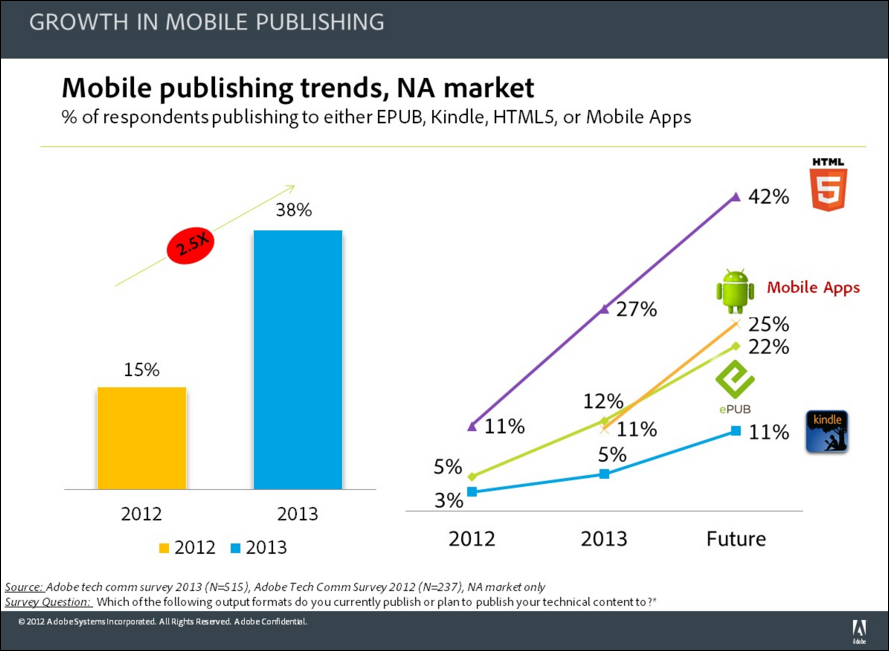
  • Tech­ni­cal writ­ers rec­og­nize the impor­tance of mobile and are embrac­ing new tech­nolo­gies. Accord­ing to research gath­ered by Adobe in 2013, 38 per­cent of respon­dents were out­putting their con­tent to respon­sive HTML5 Help, apps, and EPUB files, up from the 15 per­cent the year before.

Mobile_publishing_trends

Why Create a Mobile App?

You may con­sid­er cre­at­ing an app for the fol­low­ing reasons:

  • Your users have an inter­mit­tent con­nec­tion to the Inter­net: Once the app is installed on a smart­phone or tablet, it no longer requires a wire­less or mobile con­nec­tion to view the con­tent. In con­trast, HTML5 help sys­tems require a brows­er, which usu­al­ly needs an Inter­net con­nec­tion to view the con­tent (although some browsers, such as Google Chrome, can run in offline mode).
  • Speed: Users will get the answers they need faster using an app ver­sus launch­ing a brows­er, nav­i­gat­ing to your help page, and wait­ing for the con­tent to appear.
  • High­er vis­i­bil­i­ty: An app is installed on a user’s smart­phone or tablet, mak­ing it easy to locate and launch. In con­trast, an online help sys­tem is typ­i­cal­ly includ­ed in a soft­ware pack­age and may not be easy to find or open.

A Quick History of FrameMaker

Back in 2000,  I wrote con­tent in FrameMak­er and then con­vert­ed it to Web­Help using Quadralay Corporation’s Web­Works, which was inte­grat­ed into FrameMak­er at the time.

In 2005, Adobe acquired Macro­me­dia and with it Robo­Help, its help author­ing tool. A few years lat­er, Abobe offered its Tech­ni­cal Com­mu­ni­ca­tions Suite, which pro­vid­ed tighter inte­gra­tion between FrameMak­er and Robo­Help. For the first time, you could write con­tent in FrameMak­er and then have con­tent con­vert­ed to help by Robo­Help. Sim­i­lar to the FrameMak­er and Web­Works integration.

In the last few years, FrameMak­er has changed again so that you can direct­ly cre­ate online help direct­ly from with­in the pro­gram. FrameMak­er 2015 added the abil­i­ty to cre­ate mobile apps.

A Primer: Creating an App from FrameMaker

After you author your con­tent in FrameMak­er, select File > Pub­lish. In the Pub­lish dia­log box, select the out­put type you require: respon­sive HTML5, Mobile App, Web­Help, ePub, Microsoft HTML Help, and others.
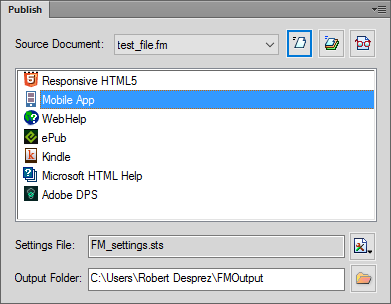
Publish_dialog

Select the Mobile App option and right-click Edit Set­tings. FrameMak­er dis­plays the Pub­lish Set­tings: FM Set­tings dia­log box, which enables you to con­fig­ure the mobile app.

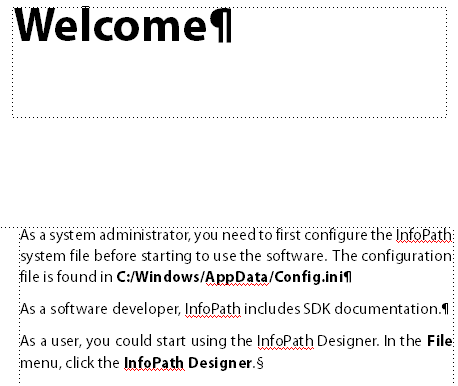
The fol­low­ing image shows some sam­ple con­tent I draft­ed in FrameMak­er with­out attempt­ing to for­mat the content.

Mobile_app_FrameMaker

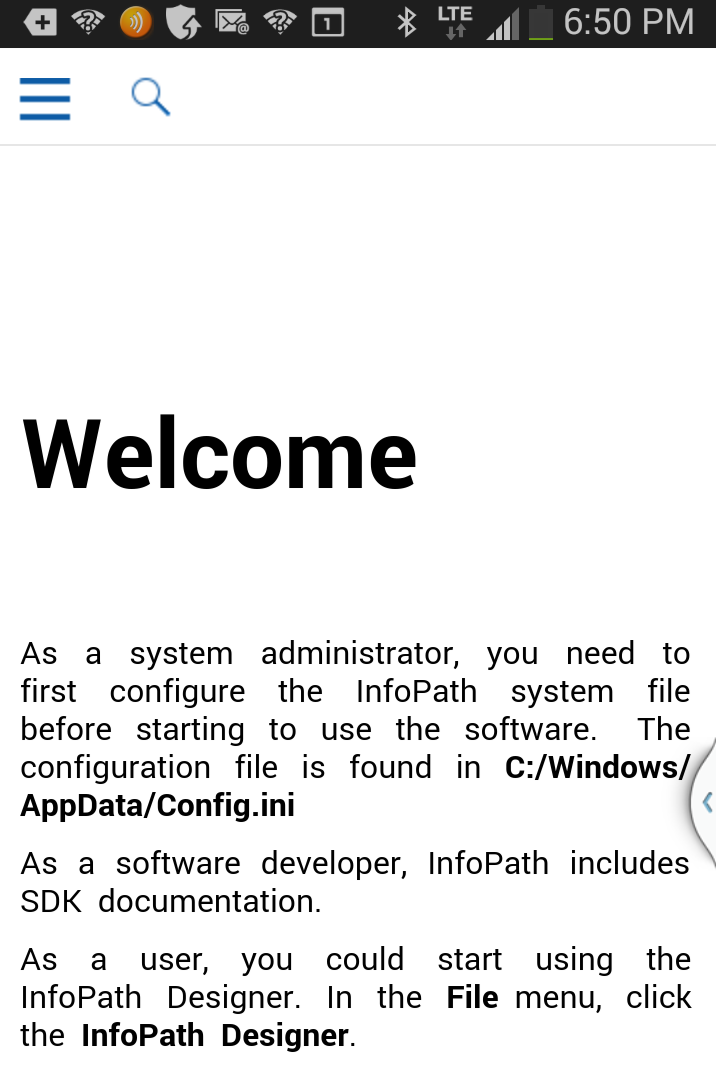
The next image shows the same con­tent that appears in a mobile app that I cre­at­ed for Android.

Welcome_mobile_app

Cre­at­ing a mobile app from FrameMak­er is sur­pris­ing­ly easy.

For more infor­ma­tion on the detailed steps, see a relat­ed blog post on cre­at­ing a mobile app using Robo­Help. The FrameMak­er user inter­face for cre­at­ing an app is very sim­i­lar to the one avail­able in RoboHelp.

Cre­at­ing Android and iOS Mobile Apps

Filed Under: Robert Desprez | Vancouver technical writer | Blog

Leave a Reply Cancel reply

Your email address will not be published. Required fields are marked *

About Robert Desprez

I have worked as a Vancouver technical writer for more than 20 years, working at some of British Columbia's largest high-tech firms. I have served in leadership positions for the Society for Technical Communication and have worked as a writing instructor at Vancouver's Simon Fraser University.

Robert Desprez Follow 1,204 239

Vancouver Technical Writer. Former Instructor at Simon Fraser University. Dog Lover. Coffee Drinker. Tennis and Piano Player.

robert_desprez
robert_desprez avatar; Robert Desprez @robert_desprez ·
11 Apr 2043062547159589215

Image for twitter card

ChatGPT vs. Gemini: I Tested Both, and the Winner Might Surpise You

Curious about AI chatbots but don’t know where to start? ChatGPT and Gemini are two of the best, and I'm her...

www.pcmag.com

Reply on Twitter 2043062547159589215 Retweet on Twitter 2043062547159589215 0 Like on Twitter 2043062547159589215 0 Twitter 2043062547159589215
robert_desprez avatar; Robert Desprez @robert_desprez ·
22 Mar 2035801301733527930

Image for twitter card

Remote work can help offset oil price shock, IEA says | LinkedIn

The International Energy Agency has outlined 10 strategies to help oil-consuming nations mitigate the impact of rising prices.

www.linkedin.com

Reply on Twitter 2035801301733527930 Retweet on Twitter 2035801301733527930 0 Like on Twitter 2035801301733527930 0 Twitter 2035801301733527930
robert_desprez avatar; Robert Desprez @robert_desprez ·
21 Mar 2035393914396692588

‘Microshifting’ puts a new spin on 9-to-5 schedules

Image for twitter card

‘Microshifting’ puts a new spin on 9-to-5 schedules

A new way of scheduling work time is remaking the typical nine-to-five routine. “Microshifting” is a trend that ...

apnews.com

Reply on Twitter 2035393914396692588 Retweet on Twitter 2035393914396692588 0 Like on Twitter 2035393914396692588 0 Twitter 2035393914396692588
robert_desprez avatar; Robert Desprez @robert_desprez ·
16 Mar 2033691191984984182

The cost of digital disorganization is nearly a month of productivity per year

Image for twitter card

The cost of digital disorganization is nearly a month of productivity per year

The problem often stems from unclear systems and ownership inside organizations, but simple habits and clearer workflo...

www.theglobeandmail.com

Reply on Twitter 2033691191984984182 Retweet on Twitter 2033691191984984182 0 Like on Twitter 2033691191984984182 0 Twitter 2033691191984984182
Load More

Recent Blog Posts

  • Using ChatGPT to read smarter
  • ChatGPT: The AI-powered proofreader
  • Four ways Confluence could be better
  • First impressions of MadCap’s purchase of IXIASOFT

About Me

Robert Desprez I have worked as a Vancouver technical writer for more than 20 years, working at Kodak, Boeing, Teck Resources, and FortisBC. In addition, I have worked as a writing instructor at Simon Fraser University in Vancouver.

Contact Me

Robert Desprez Com­mu­ni­ca­tions Inc.
North Van­cou­ver, British Columbia
Canada
Phone: 604–836-4290

  • Email
  • LinkedIn
  • Twitter

Copyright © 2026  · Robert Desprez Communications Inc.